 PulsePom
How a study group works
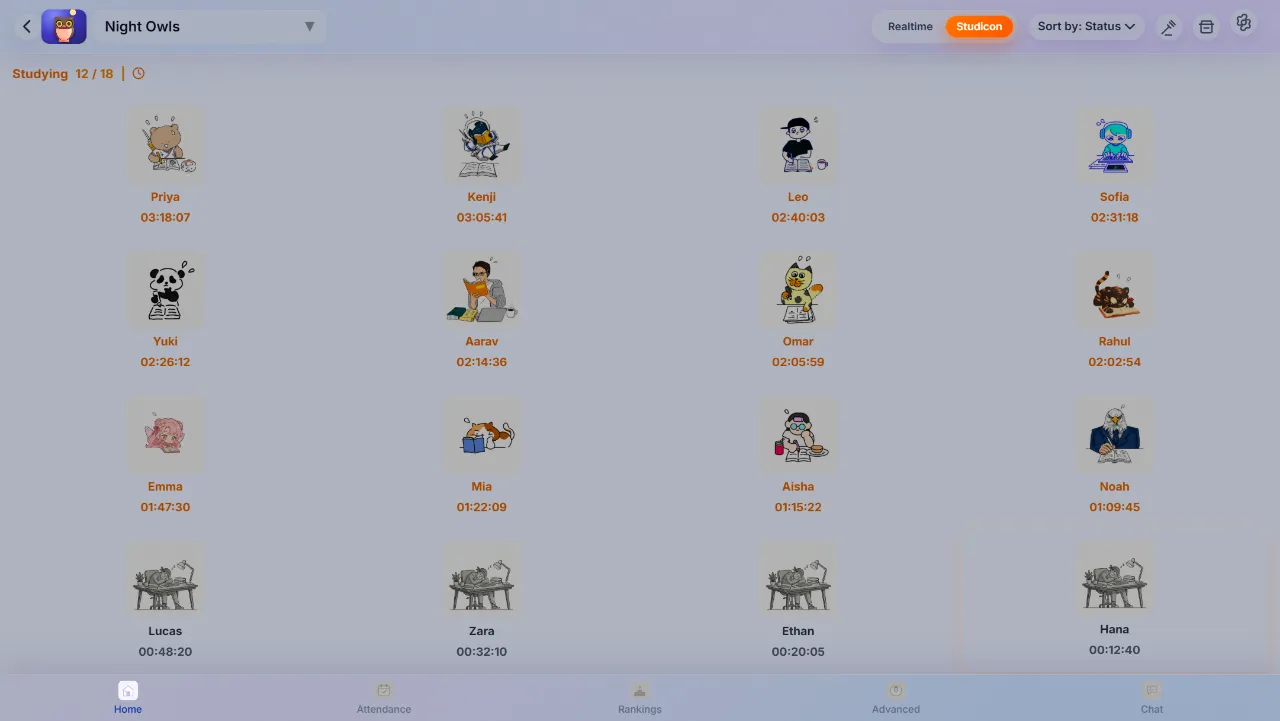
Each member studies with their own PulsePom timer, on the web, Android or Windows. The group's Home puts everyone together:
- Who is studying now, each with their Studicon, and who isn't.
- How long each member has studied today, so the group sees the effort, not just the intent.
- Attendance, group stats and a group leaderboard, for the day, the week and beyond.
There's no camera, microphone or call to join. You study; your group sees that you're studying.
Studicons: avatars that change as you study
Every member has a Studicon, one of more than 370 illustrated study avatars. A member's Studicon changes with every hour they study that day, and new ones unlock as you study more. All of them are free, and none are sold.
Keep each other going
- Wake-up nudges: send a nudge to a friend who should be studying, or to the whole group.
- Study challenges: set one- to three-star study-hour goals and see each member's progress and the results.
- Quizzes and polls: test each other before an exam, or decide when to meet.
- Roles: Group Leaders, Co-Leaders and Managers look after the group and its members.
A group chat made for studying
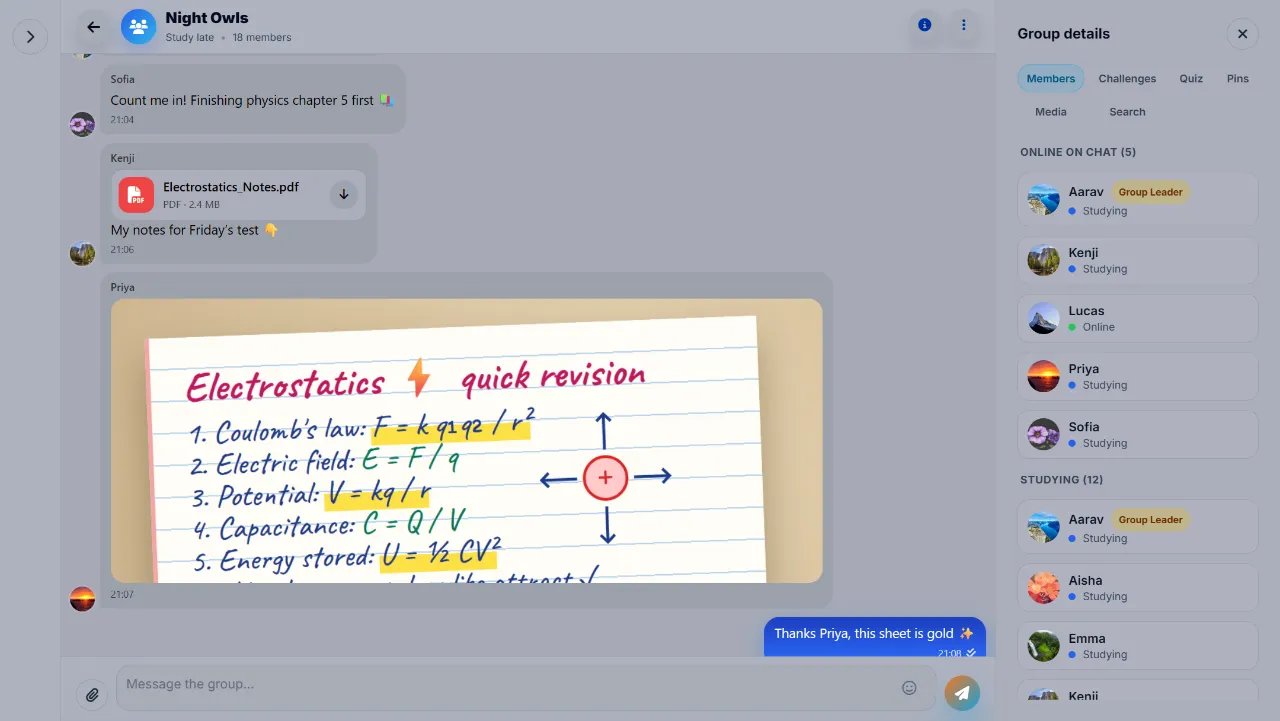
Talk and share notes next to your group's study time: replies, reactions, read receipts and @mentions, photos and files such as PDF notes, and pinned and scheduled messages. The group details panel keeps Members, Challenges, Quiz, Pins, Media and Search in one place.
Every image shared in PulsePom is checked by AI moderation, and every file is scanned for viruses, malware, phishing and NSFW content before anyone can see it. Members can report messages, and accounts that break the rules can be suspended or banned.
Start a group in three steps
- Open PulsePom and sign in, free, with email, Google or Microsoft. Study groups need an account, so the group knows who you are.
- Open Group Study and create a group. Make it public, so anyone can find it with Find Groups, or protect it with a password.
- Share the group's invite link with your friends, and start your timers.
Studying alone? Use Find Groups to join a public group of people preparing for the same kind of exam.
What PulsePom groups don't do
- There are no video or voice calls. If you want to see each other on camera, YPT has cam study and Focusmate pairs you with a partner on video.
- Group status updates every few minutes, rather than second by second.
- On iPhone and Mac, groups work in the browser; there is no App Store app.
FAQ
Is studying with friends on PulsePom free?
Yes. Study groups, group chat, Studicons, challenges, quizzes, polls and leaderboards are all free, with no ads.
Do I need a camera to study with friends?
No. PulsePom groups show who is studying and for how long, without video. Many people find that seeing their friends' study time is enough to keep them going.
Can I study with people I don't know?
Yes. Find Groups lists public study groups you can join. You can also keep a group private with a password and an invite link.
Is the group chat safe for students?
Every image is checked by AI moderation for NSFW content, personal information, self-harm, threats, weapons, injury and exam cheating, and every file gets an antivirus and NSFW scan, before anyone can see it. Messages can be reported, and rule-breakers can be suspended or banned.
Can my friends use different devices?
Yes. One group works across the web, Android and Windows, and on iPhone and Mac in the browser.