 PulsePom
How tracking works
You don't log hours by hand. Start a Pomodoro or the Normal timer, pick a subject (and a task if you like) and study. When you stop, the session is saved with how long you focused and when.
- Subjects: your courses or topics, each with its own colour.
- Tasks: from your Planner, so you can see what each hour went into.
- Days off: mark the days you rest.
The stats
PulsePom's Stats has three free views:
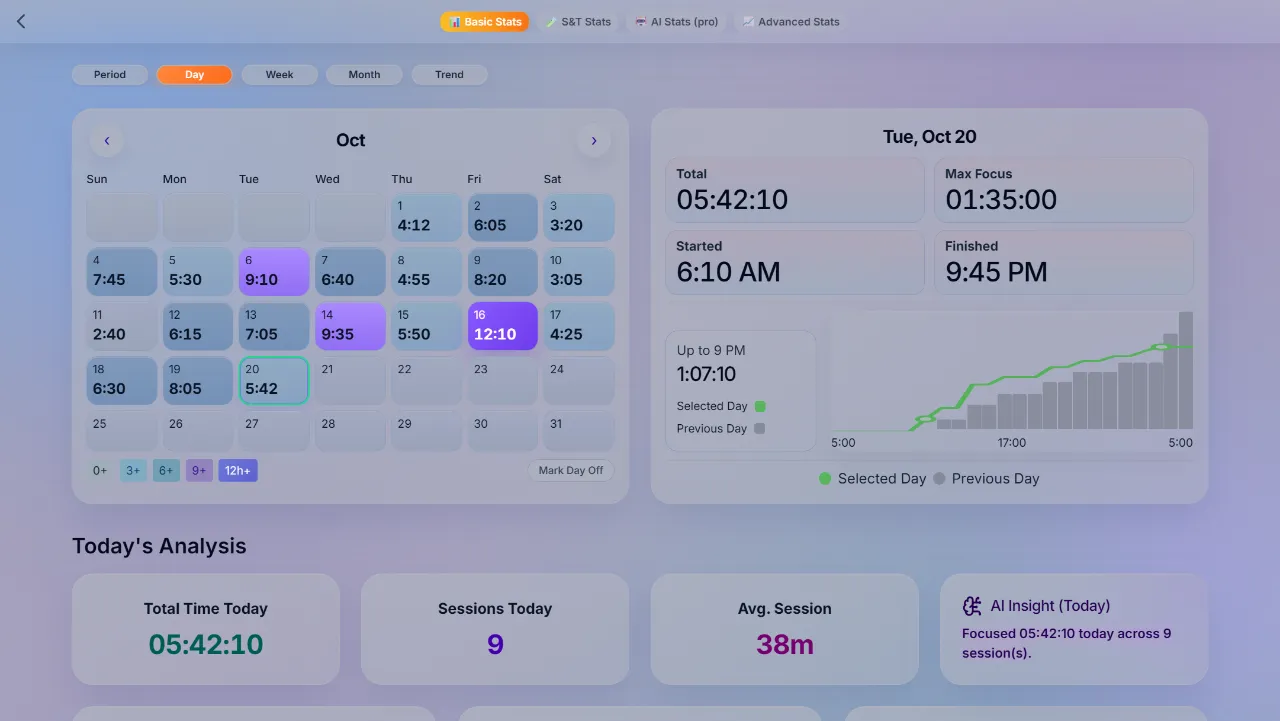
- Basic Stats: your day, week and month, a study heatmap calendar with each day's total, when you started and finished, your longest focus, your streak, and an hour-by-hour chart that compares today with yesterday.
- Advanced Stats: patterns over the last 30 or 90 days, counting every day or only the days you studied.
- Subjects & Tasks Stats: how your hours split between subjects and tasks.
Stay motivated
- A daily study goal, streaks and achievements.
- Leaderboards: compare hours globally for the day, the last 7 days and the last 30 days, or inside your study group. (Leaderboards need a free account.)
- Habit Tracker: add studying as a habit and see your weekly and monthly progress next to your other habits.
Without an account, and offline
Choose Continue without an account and the timer and all three stats views work at once, with everything kept on your device. They keep working offline too. If you sign in later, your sessions, subjects and days off move into your account, so your history stays whole.
Start tracking your study hours
No sign-up. Open the Timer, pick a subject and press Start; your first session shows up in Stats as soon as it ends.
FAQ
What is the best way to track study hours?
Use a timer that saves each session to a subject, so tracking happens as you study instead of at the end of the day. PulsePom does that, then shows your totals by day, week and month, a heatmap and your streak.
Can I see how many hours I studied this week?
Yes. Basic Stats shows today, this week and this month, and the heatmap shows every day's total at a glance.
Can I track study hours for each subject?
Yes. Every session is saved to a subject, and Subjects & Tasks Stats shows how your hours split between them.
Does the study tracker work on my phone and computer?
Yes. Sign in, free, and your hours sync between the web, Android and Windows. Without an account, each device keeps its own.
Is it free?
Yes. The timer, all stats views, streaks and leaderboards are free, with no ads. Premium adds AI Stats Pro, a study coach that reads your stats and builds study plans from them.