 PulsePom
What it does
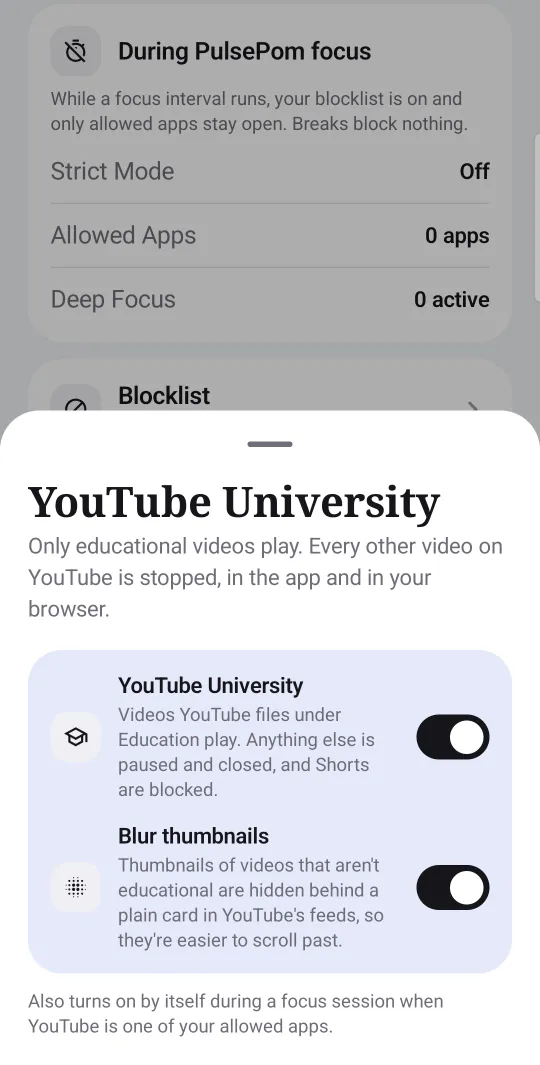
YouTube University is a setting in PulsePom's Android app. While it is on:
- Educational videos play, the ones YouTube itself puts in its Education category.
- Other videos are paused and closed, so a lecture can't turn into an hour of something else.
- Shorts are blocked.
It works in the YouTube app and in your browser.
How it decides
PulsePom doesn't judge videos itself. It asks YouTube's own API which category a video is in, using the video's title and channel name, and lets it play if YouTube files it under Education. Those titles and channel names are the only thing PulsePom's blocking ever sends off your phone; everything else the blocker sees stays on it.
Because it follows YouTube's categories, some useful videos may be filed elsewhere and won't play while YouTube University is on. Turn it off when you need them.
Turn it on
- Install PulsePom from Google Play. Sign in, free, or continue without an account.
- Allow the permissions PulsePom asks for, and turn on its Accessibility Service in your phone's settings when the Block section asks.
- In Block, turn on YouTube University. You can also have it switch on by itself during focus sessions.
YouTube University is free, like every blocking feature in PulsePom.
FAQ
Can I block everything on YouTube except educational videos?
Yes. With YouTube University on, only videos that YouTube files under Education play; others are paused and closed, and Shorts are blocked.
Does YouTube University work in Chrome?
Yes. It works in the YouTube app and in your browser on Android.
Is YouTube University free?
Yes. It's part of PulsePom's Android app, where every blocking feature is free with no ads.
Is YouTube University on iPhone or Windows?
No. It's in the Android app only.